Layouts
The Keyboard already contains predefined layouts for different input types. What type of layout is used depends of the TouchScreenKeyboardType of that input.
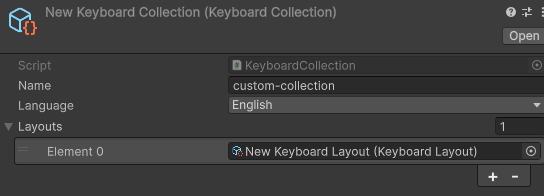
Layouts are grouped together in a KeyboardCollection, that defines the language of those layouts.
Default Collection
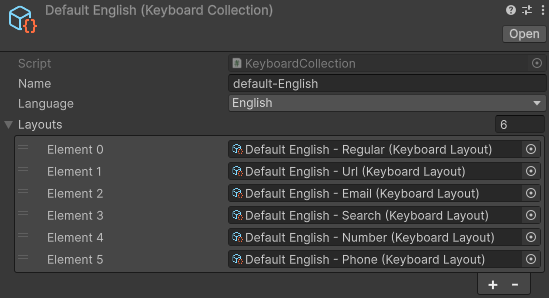
Inside the Data/Default folder is the default collection, which contains the layouts for english and german. A collection defines the language and contains a set of Layouts.
Layout
The default colleciton contains common layouts such as a regular keyborad and numpad.
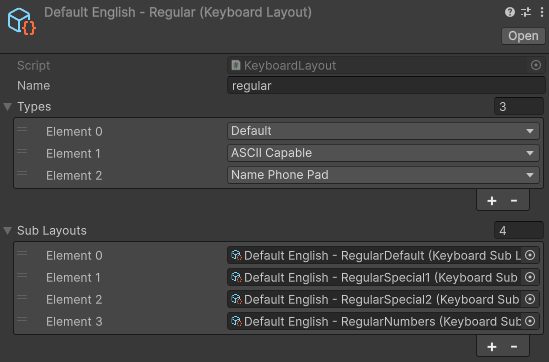
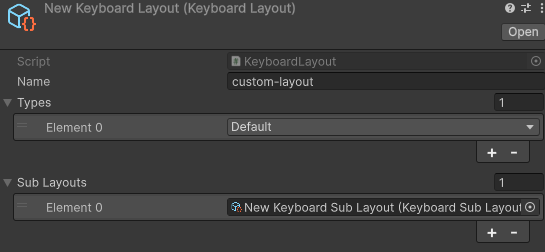
Types: Define the
TouchScreenKeyboardTypetypes that this layout should be used for.Sub Layouts: The different possible button layouts.
SubLayout
A SubLayout defines the button layouts.
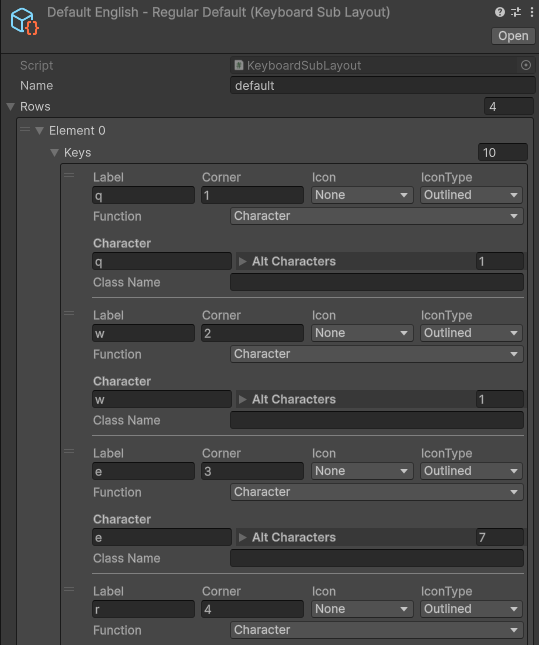
Rows: define the keys used per row.
Key
Label: The text visible on the button.
Corner: The text visible on the top right corner.
Icon: Show an icon instead of the text.
IconType: MaterialIcon icon style.
Function: What the button should do.
Class Name: Custo USS class name.
If function is Character
Character: The actual text that the keypress.
Alt Characters: The characters that appear when doing a long press.
If function is Shift
Alt Icon: The icon of the shift button when caps lock is on.
Alt IconType: MaterialIcon icon style when caps lock is on.
If function is Switch
Switch To Name: The sublayout name to switch to when pressed.
Custom Collection
There are multiply ways to create your own layouts.
Create your own using the provided ScriptableObjects (Create -> Immerea -> Keyboard):
Create a KeyboardSubLayout to define your button layout.
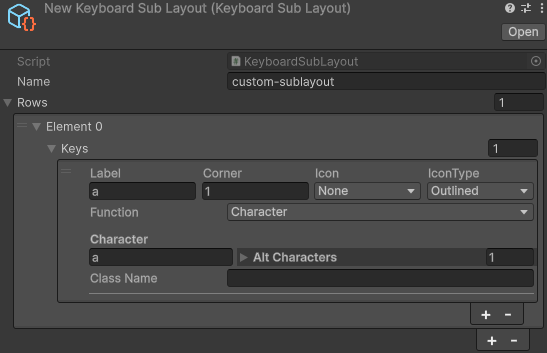
Create a KeyboardLayout to define the keyboard types and assign the KeyboardSubLayout.
Create a KeyboardCollection to define the language and assign the KeyboardLayout.
Alternatively, create the ScriptableObjects dynamically with code:
public static class CreateCustomKeyboard
{
    [MenuItem("Tools/CreateCustomKeyboard")]
    public static void CreateCustomKeyboard()
    {
    string path = "Assets/Immerea/VR Keyboard/Samples/Data/CustomKeyboard/";
    KeyboardSubLayout customSubLayout = ScriptableObject.CreateInstance<KeyboardSubLayout>();
    customSubLayout.Name = "custom-sublayout";
    customSubLayout.Rows = new List<KeyboardKeyRowData>()
    {
        new List<KeyboardKeyData>()
        {
            KeyboardKeyData.CreateCharacter("a", "1"),
            KeyboardKeyData.CreateCharacter("b", "2"),
            KeyboardKeyData.CreateCharacter("c", "3"),
            KeyboardKeyData.CreateFunction(KeyboardKeyFunction.Enter, MaterialIcons.keyboard_return),
        },
    };


    KeyboardLayout customLayout = ScriptableObject.CreateInstance<KeyboardLayout>();
    customLayout.Name = "custom-layout";
    customLayout.Types = new List<TouchScreenKeyboardType>() { TouchScreenKeyboardType.Default };
    customLayout.SubLayouts = new List<KeyboardSubLayout>()
    {
        customSubLayout,
    };

    KeyboardCollection customCollection = ScriptableObject.CreateInstance<KeyboardCollection>();
    customCollection.Name = "custom";
    customCollection.Language = SystemLanguage.English;
    customCollection.Layouts = new List<KeyboardLayout>()
    {
        customLayout,
    };

    KeyboardAssetCreator.CreateAsset(customCollection, path);

    AssetDatabase.SaveAssets();
    AssetDatabase.Refresh();
}