Settings
Settings can be changed per Keyboard using the properties of the main script attached to the prefab Keyboard.
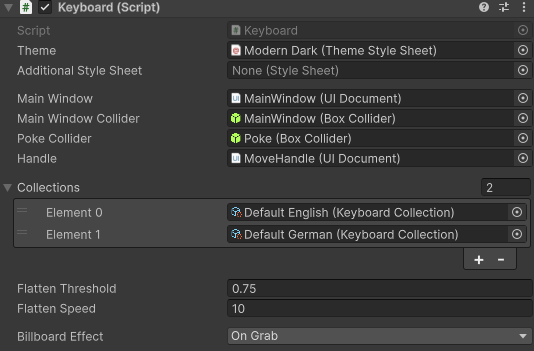
References
Theme: Assign a Theme Style Sheet (TSS) that defines colors, fonts, and layout.
Additional Style Sheet: Optional USS style sheet to override or extend the theme.
Main Window: Reference to the UI Document representing the main Keyboard window.
Main Window Collider: Collider for interaction collision.
Poke Collider: Collider trigger for poke interaction.
Handle: Reference to the UI Document representing the main handle.
Collections
List of Keyboard collections that define all the layouts for the languages.
See Layouts for more information.
Flatten
Flattens the keyboard when lowering it, to simulate desk environment.
Flatten Threshold: What angle should the Keyboard start flattening (range 0-1)
Flatten Speed: Transition speed.
Billboard Effect
Billboard Effect: Controls how the Keybaord UI rotates to face the user in VR. Options such as On Grab rotate the UI only when grabbed.